
Gransnet forums

Chat

Some help, please. Email question.

(44 Posts)
Callistemon Mon 10-Feb-20 19:29:31

Just because your phone deletes emails after a certain time (I didn't know that, in fact) shouldn't mean that it is deleted from your email account, should it, unless you delete it yourself?

If you went on another device would your emails not all be there? You could use a pc at the library, for instance.

Marydoll Mon 10-Feb-20 19:29:27

Found out! ?

MissAdventure Mon 10-Feb-20 19:27:57

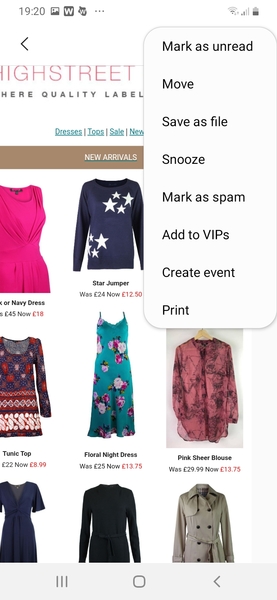
My list has 'Mark as unread'.
I wonder if I do that, will it buy me some time.

By the way, I like that star jumper, and its reduced. smile

Marydoll Mon 10-Feb-20 19:26:42

Where those folders can be seen, try going down as far as you can and see if there is a function, Create a new folder.

Marydoll Mon 10-Feb-20 19:24:53

I have include a screenshot.

MissAdventure Mon 10-Feb-20 19:21:47

My list only includes trash, spam, passwords and recycle.

What a palaver. At this rate i'll just have to do all of the courses one after another, instead of leaving them until I get threatening phone calls from head office.

Marydoll Mon 10-Feb-20 19:14:27

I have worked it out. I opened the email, went to top right of screen, clicked the little lines and there is a facility to move the email. Clicked Move .You are asked where you want to send it, a list of folders appears. Choose the one you want to store it in. That's it. Hope this makes sense. I'm useless typing on a phone.

MissAdventure Mon 10-Feb-20 19:11:04

Oh gawd! That sounds complicated! blush

Maybe my phone is "too old"?
Others, (older models) have allowed me to save though.

I'm sure they put less features in each upgrade, so that you yearn for the next one!

Marydoll Mon 10-Feb-20 19:07:47

MissAdventure, I tried to do it on my phone. I discovered that if I slide the page to the right, there is a facility on the left of the page to make a folder, to store an email.

MissAdventure Mon 10-Feb-20 17:25:04

I can't seem to find a method of saving the email on my phone, which is what I need, as it contains links to training courses.

I'm sure previous phones have had some option of saving.

Thank you all. I shall investigate your suggestions. smile

BlueSky Mon 10-Feb-20 08:49:50

Your phone should have a Saved email folder. Transfer it in there and it will be kept until you delete it.

Humbertbear Mon 10-Feb-20 08:23:37

If you can’t take a screen shot , can you copy and paste the text into another app such as Notes?
Alternatively, forward the email to yourself so it is in your Sent box.

phoenix Mon 10-Feb-20 08:02:53

Can you take a screen shot of it and save that as a photo?

Yehbutnobut Mon 10-Feb-20 07:48:22

Create a folder within your emails and keep it there. Or print it out.

Marydoll Mon 10-Feb-20 06:53:04

I usually put emails I want to keep in a folder, can you do this on your phone?

BlueBelle Mon 10-Feb-20 06:30:50

Isn’t it safe if you archive it

NfkDumpling Mon 10-Feb-20 06:30:11

Try your local library. They may be able to help you print it out.

BradfordLass73 Mon 10-Feb-20 06:22:13

If you have a USB port in your phone, you could download it to that.
Or upload it to a Cloud system, you'd have to join one such as Dropbox or Google docs but that's free.

Or send it to someone who can print it out for you.

Technology is complicated and you're certainly not stupid for not knowing :-)

MissAdventure Mon 10-Feb-20 01:11:41

Hoping someone can help me, and that nobody thinks I'm too stupid (or at least doesn't say it!)

I have an email I need to keep, and I'm wondering where I can 'put it' and how.

I just have my phone, which deletes emails after a while.

Can I move the email somewhere where it will be safe, please?

Thank you! smile
