
Gransnet forums

Chat

Be careful when clicking on a link or buying online

(10 Posts)
Wheniwasyourage Thu 26-Jan-23 11:16:25

I didn't get it at first either, so thanks Oopsadaisy1. That's good advice never to click on links in emails.
TopsyIrene06 Thu 26-Jan-23 10:53:29

Thank you so much Oops.

I could not understand what you meant because I am an old git but got it in the end. So easy for me to miss.

NotSpaghetti Thu 26-Jan-23 10:45:58

... Maybe it's just phishing??

I wish I could hold all this stuff in my brain!

NotSpaghetti Thu 26-Jan-23 10:42:55

Is this a social engineering type threat vector?
I'm really unclear on these different types of threats!

Anyway it's very clever!

Sparklefizz Thu 26-Jan-23 10:24:14

Gosh! I wouldn't have noticed. Thanks oopsadaisy

Baggs Thu 26-Jan-23 10:22:33

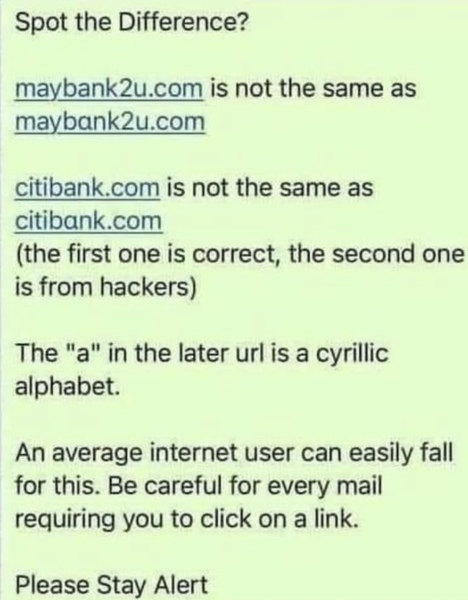
The warning in the photo is about clicking on links in emails. The only safe rule is never click on a link in an email. Type the address into your browser.

Apple computers allow you to look at links without opening them. There is a little ˘ sign to the right of addresses which you can 'hold' on to see what the address is.

I will ask MrB about the use of the Cyrillic alphabet.

V3ra Thu 26-Jan-23 10:09:36

Nandalot

Thank you, Oopsadaisy1, I couldn’t spot the difference until your explanation.

No, me neither.

Elegran Thu 26-Jan-23 09:47:32

In the settings for your browser, you can probably set it to ONLY go to sites with https/ . Browsers often have a little sign beside the site name too, which looks like a shield shape, or a closed padlock, if the site is a secure one. This is true of Firefox, and I believe of others.

Nandalot Thu 26-Jan-23 09:41:39

Thank you, Oopsadaisy1, I couldn’t spot the difference until your explanation.

Oopsadaisy1 Thu 26-Jan-23 09:29:14

Just that really, see pic.

Also use sites with Https/…… this is a secure site

Not Http - this is not a secure site.
