Gransnet forums

Site stuff

Deleting messages on a pm

(13 Posts)
Chestnut Wed 29-Jul-26 18:04:26

MT62

eddiecat78

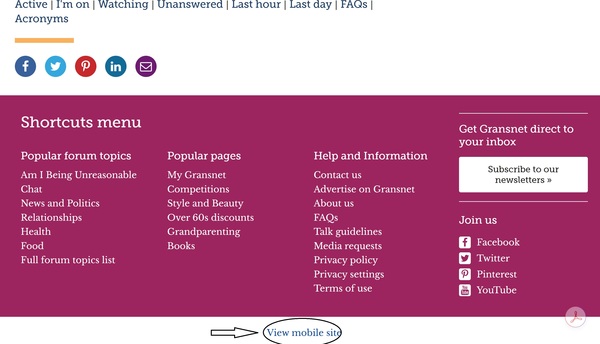
You'll need to make sure you are on the "desktop site" not the mobile site. The option is at the bottom of the page.
You'll then be able to delete messages - if you're like me you'll need a magnifying glass to read the desktop site!

Sorry I am a little thick, what’s a desktop?

A desktop computer is literally just that, like in an office, a screen, a keyboard, mouse and the computer itself is a big thing usually on the floor. PC is personal computer. Just Google anything you want to know and it will tell you in detail i.e. what is a pc?

The mobile view is obviously for a smartphone, I've no idea what view you use with a tablet or a notebook but a laptop is basically the same as a pc.

Maremia Wed 29-Jul-26 17:53:57

Is that about using your PC instead of your phone?

Marydoll Wed 29-Jul-26 17:18:48

Sorry if you see this, you're actually on Desktop version! I have brain fog!!

Marydoll Wed 29-Jul-26 17:16:03

MT62

I think last time I went on those little symbols I managed to lock myself out.
I’ll ask my hubby to sort it.
Thanks everyone 👍🏻

To change to Desktop site, click on Mobile site.

MT62 Wed 29-Jul-26 17:08:46

I think last time I went on those little symbols I managed to lock myself out.
I’ll ask my hubby to sort it.
Thanks everyone 👍🏻

MT62 Wed 29-Jul-26 17:06:50

eddiecat78

You'll need to make sure you are on the "desktop site" not the mobile site. The option is at the bottom of the page.
You'll then be able to delete messages - if you're like me you'll need a magnifying glass to read the desktop site!

Sorry I am a little thick, what’s a desktop?

MT62 Wed 29-Jul-26 17:05:35

Chestnut

I'm on a desktop, so just took a look on the mobile site and it's different (of course). Open the message and the dustbin is at the bottom. On the desktop it's at the top. I can't see a way to delete several at once on the mobile site but you can on the desktop. To go to the desktop site head right to the bottom of any page where you can choose to view either mobile or desktop whichever you prefer.

Ahh thanks chestnut will have a look👍🏻

MT62 Wed 29-Jul-26 17:04:38

Chestnut

Open the message and you'll see a little dustbin symbol. I think that's the way although I've never deleted a PM.

Hi I have tried that but doesn’t appear to work!

Chestnut Wed 29-Jul-26 16:58:33

I'm on a desktop, so just took a look on the mobile site and it's different (of course). Open the message and the dustbin is at the bottom. On the desktop it's at the top. I can't see a way to delete several at once on the mobile site but you can on the desktop. To go to the desktop site head right to the bottom of any page where you can choose to view either mobile or desktop whichever you prefer.

eddiecat78 Wed 29-Jul-26 16:54:29

You'll need to make sure you are on the "desktop site" not the mobile site. The option is at the bottom of the page.
You'll then be able to delete messages - if you're like me you'll need a magnifying glass to read the desktop site!

Chestnut Wed 29-Jul-26 16:47:33

I've just seen another dustbin! To delete several at once, click on the box at the side of the messages to select them and then the dustbin.

Chestnut Wed 29-Jul-26 16:45:39

Open the message and you'll see a little dustbin symbol. I think that's the way although I've never deleted a PM.

MT62 Wed 29-Jul-26 16:42:13

How do I delete a private message please?