Gransnet forums

Technology

Microsoft Surface Pro 4

(37 Posts)
Anniebach Tue 26-Apr-16 11:37:52

Does anyone have one please, I have to decide between the Microsoft or a new iPad

Tizliz Fri 06-May-16 14:52:16

pompa had to give in and load a new user - hadn't wanted to do as I had to reset up Outlook (only 3500 emails downloaded into the in-box). Hopefully sorted out now. Thanks for your help

Tizliz Fri 29-Apr-16 10:05:09

Sorry forgot about this yesterday, text is not very clear but you can see the picture OK.

Anniebach Thu 28-Apr-16 22:28:52

Thank you pompa

pompa Thu 28-Apr-16 22:12:48

Good luck AnnieBach, I'm sure you will get on fine. I have upgrade two laptops from windows 8.1 to 10 without a single problem. Just accept that it is different and will take a little while to get used to. It is far more stable and reliable than previous versions.

pompa Thu 28-Apr-16 22:03:19

Yes I use it. You don't have to keep copies on your PC. BUT if you wish to use your PC off line you will need both copies. The primary use of the cloud is to backup data or share data.

bartonlady Thu 28-Apr-16 21:55:55

Does anyone use BT cloud? I bought this service to store photos etc and to free up space on my pc hard drive. I've put items on t he cloud but they are also on my pc, so no space saved!

Anniebach Thu 28-Apr-16 20:32:48

Done it pompa' bought a book which really is for idiots ' chose a new toshiba lap top which will be delivered tomorrow . The book said upgrading from windows 8 to 10 can cause problems when using 10, so am having lap top windows 10 , do wish me luck smile and thank you for your advice and help . Do keep an eye on this section please , the thread title will be * ît

Anniebach Wed 27-Apr-16 23:09:05

Thank you pompa

pompa Wed 27-Apr-16 21:21:05

That didn't print very well

Version 1511
Build 10586.218

Tizliz Wed 27-Apr-16 20:58:44

Thanks pompa not in the office until Friday so will try then. Anything to put off doing the VAT!

pompa Wed 27-Apr-16 19:32:40

Just a thought. Most of the posts I see about this problem are quite old. Have you updated Windows10 to the very latest version.

You should have this one.

Servicing option VersionOS build Availability dateLatest revision date
Current Branch (CB)151110586.21811/12/2015 4/12/2016

pompa Wed 27-Apr-16 19:23:31

Tizliz, this appears to be a known problem.

This web page lists various solutions, try them in order.
home.bt.com/tech-gadgets/computing/has-your-windows-10-start-menu-stopped-working-here-are-four-ways-to-fix-it-11364000314532

I am running the sfc /scannow at this very moment to see what it reports.

Tizliz Wed 27-Apr-16 18:38:35

Can't left click the windows icon - that is the problem.

pompa Wed 27-Apr-16 18:07:08

Ok.
To pin a programme to the task bar.

Left click the windows icon or press the windows key.
Open the Apps tab
Find the app you want, right click on it, select "more", click on "Pin to Taskbar"

The "Start" menu has been replaced with a new menu which you get to by :-
Left click the windows icon or press the windows key.

This gives you both a graphical view of your app and a list by clicking "Apps"
You can drag the graphical icons around to organise them to suit yourself, delete one you never use and add others to suit yourself. I tend to either put shortcuts on the desktop or onto the taskbar.

A very useful shortcut in the windows key + tab, this will show you all running apps.

Hope this helps.

If you have problems like the above, by all means ask and I will elp if I can. OR simply search on google, most questions are on there. OR use Cortana, that's what it's good at.

Tizliz Wed 27-Apr-16 13:48:34

pompa can I pick your brains? I have had to reload Wins 10 but I still don't have a proper start menu - where you left click on the windows sign in the bottom left corner. I have to right click and get less options. I can't add icons to the bottom bar and I can't get the calendar. no search option. I have read several reasons but am not confident. Does your Windows 10 For Dummies cover this? If so I will buy a copy.

Anniebach Wed 27-Apr-16 13:31:53

Thank you pompa, will order a copy today

pompa Wed 27-Apr-16 13:00:46

I bought "Windows 10 For Dummies", helped get me started.

Anniebach Wed 27-Apr-16 12:56:31

That does look interesting , thank you Tizliz.

pompa, I think an idiots guide to Windows 10 is just what I need , will look on Amazon now , thank you

pompa Wed 27-Apr-16 12:08:09

ouch, just looked at the price -- £850 ish, too rich for me.

Tizliz Wed 27-Apr-16 11:37:13

Can't print this article out, but I have the hard copy of the magazine at home so will do it tonight/tomorrow when I am at home. This is the basic text but can't get the picture.

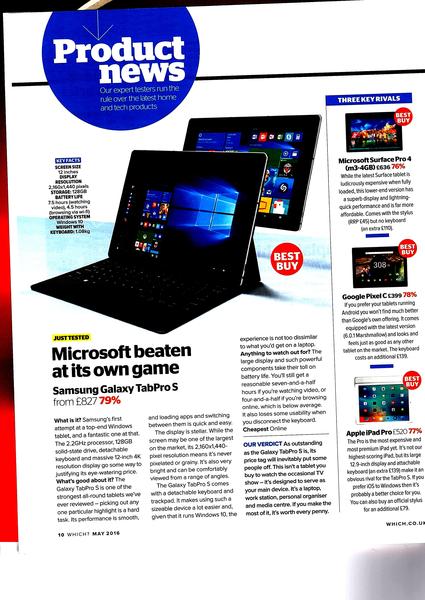
Samsung’s first attempt at a top-end Windows tablet, and a fantastic one at that. The 2.2GHz processor, 128GB solid-state drive, detachable keyboard and massive 12-inch 4K resolution display go some way to justifying its eye-watering price.

What’s good about it? The Galaxy TabPro S is one of the strongest all-round tablets we’ve ever reviewed – picking out any one particular highlight is a hard task. Its performance is smooth, and loading apps and switching between them is quick and easy.

The display is stellar. While the screen may be one of the largest on the market, its 2,160x1,440-pixel resolution means it’s never pixelated or grainy. It’s also very bright and can be comfortably viewed from a range of angles.

The Galaxy TabPro S comes with a detachable keyboard and trackpad. It makes using such a sizeable device a lot easier and, given that it runs Windows 10, the experience is not too dissimilar to what you’d get on a laptop.

Anything to watch out for?
The large display and such powerful components take their toll on battery life. You’ll still get a reasonable seven-and-a-half hours if you’re watching video, or four-and-a-half if you’re browsing online, which is below average. It also loses some usability when you disconnect the keyboard.


pompa Wed 27-Apr-16 11:17:48

BUT, if you don't like W10, this won't be for you.

pompa Wed 27-Apr-16 11:17:02

Tizliz, that looks promising. You do need a login to view the review, so if you could scan it, that would be great.

Looks like it has similar functionality to the MS surface pro. The only thing that would concern me is the lack of ports. Must check one out somewhere.

Tizliz Wed 27-Apr-16 10:31:38

Which? are recommending the new Samsung Galaxy TabPro

Don't know if you can see this without a subscription (let me know if you can't and I will scan the article)

magazine.which.co.uk/#!edition/edition_w0516/article/edition_page-3282

pompa Wed 27-Apr-16 09:07:56

If you use Windows10 in desktop mode it is similar to previous versions of Windows. BUT, it does have some differences and several of those make it far more friendly and incorporate some of the advantages of tablets. It is worth taking the time to watch an online tutorial or get an idiots guide to W10. An hour or two learning the options available will make it a much better experience.
Just trying to use it as though it was W7, will be frustrating, I would liken it to buying a new car and expecting everything to be exactly the same as a 5 year old model.

Anniebach Wed 27-Apr-16 08:19:46

Sorry, I can't post links pompa. Think perhaps I should give the notebook another go and try to like Windows 10 .