
Lame Limericks (but they are funny anyway) (
Acute anxiety after death of my husband


Welcome to our Gransnet forums, the home of Gransnet's discussions. It’s lovely to have you here. Gransnet aims to make grandparents’ lives easier, more interesting and fun. Perhaps you’re looking for friendly, light-hearted chat with other folk, or maybe you’re in need of some advice. Having an online community at your fingertips can be a great support and comfort. On Gransnet you can share your favourite recipes, ask about fun activities to do with your grandkids or seek opinions on a family or friendship issue that may be bothering you. Whatever you're looking for, you’ll find Gransnet users are a great, friendly bunch, always ready to offer support, conversation and (virtual) company.
If you’ve never joined an online forum before - or even if you have - you may be feeling a bit perplexed about how to get involved. To get you started, we’ve put together this simple guide for newcomers to the site and once you've finished reading our guide, simply click here to return to the conversation.
How forums are organised | How do I join? | How do I log in? | How do I post? | What are the rules? | How do you post smileys and links? | How do I post a photo? | Can I change the way I view discussion threads? | How do I search the forums? | What do all those acronyms mean? | How do I subscribe to the newsletter? | What if I get stuck?
It’s all pretty straightforward, we promise. Gransnet forums are divided into a range of topics, such as Chat, Relationships, News and politics, Grandparenting and many more. You can see the full range on our list of forum topics here.
In each topic you’ll find various conversations (also known as 'threads'). To read the whole discussion, simply click once on the title. You can also look at a list of our active conversations on Gransnet by clicking the Active button on the forums page, under the Gransnet forums heading. This is a good way to get a flavour of the range of issues Gransnetters are talking about, as the threads with the most recent posts are shown here.
Anyone with web access can read the forum discussions on Gransnet. But if you want to get involved by adding messages (also known as ‘posts’) to existing discussions and create new discussions, you’ll need to sign up as a Gransnet member. Not quite sure how to do this? Read on to find out how to become a Gransnet member today…
To post on the forums, you first need to sign up to Gransnet. Don’t worry, it’s not complicated - and it’s free! Sign up either by clicking on the yellow Join Gransnet button, displayed in the top right-hand corner of any page on site, or by using this link here: www.gransnet.com/register. You'll then be taken through to our registration page, which looks like this:
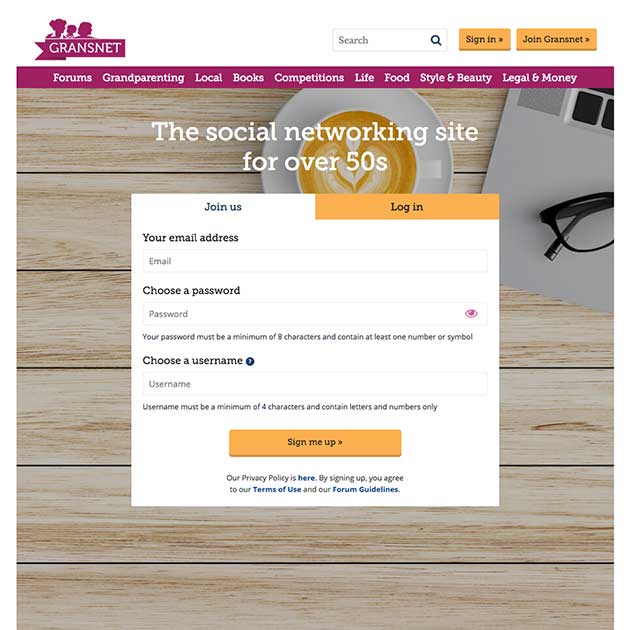
To register with Gransnet, you need to provide your email address, a password (which needs to be a minimum of 8 characters and contain at least one number or symbol) and choose a username.
Your username is the name that your posts and messages will appear to come from on the site. Just to explain, the beauty of Gransnet is that it’s anonymous. This is why it’s the ideal way to chat about subjects that you don’t feel comfortable discussing in ‘real life’. However, with anonymity in mind, it’s important to avoid using your real name or any other identifying details, such as your date of birth, in your username.
If you're struggling to think of a suitable username, try combining non-identifying details such as your favourite colour, hobby or food or even your pet's name, as long as it’s not too distinctive (‘BlueCrochet’ or ‘FidoFrenchFries’, anyone?!)
To log in to your Gransnet account, you need to go to our log in page, which you can find here or by clicking on the yellow Sign in button on the top left-hand side of any page on site when you are logged out (it's next to the Join Gransnet button).
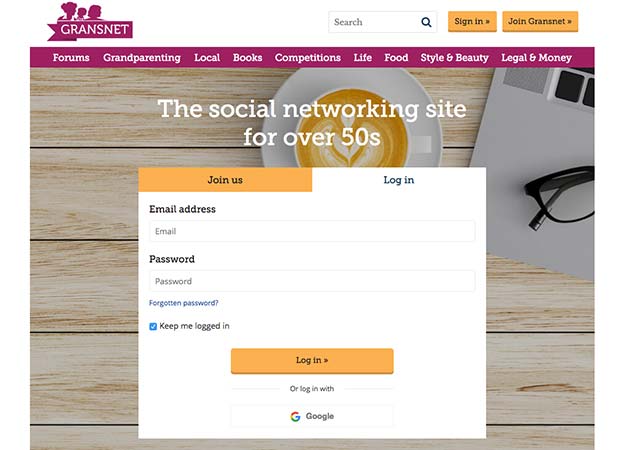
You'll then need to enter your email address and password in the boxes shown above in the image of the log in page. If you've forgotten your password (and don’t worry, you won’t be the first or last to do this, we assure you) you’ll need to reset it. You'll find a forgotten password link under the password box.
Want to remain logged into your Gransnet account so you don't have to sign in every time you access the site? We'd recommend making sure the Keep me logged in box is ticked.
When you've entered your details, simply click the Log in button - and that’s it! You’re in. Let the chats begin…
To post a message to an existing discussion, click on the Add comment link over the title or above any post. This will take you down to the bottom of the discussion to an Add your message here box. Type your wise or witty words into the box. Having issues? Make sure you’re logged in; you can only post on our forums if you’re logged in.
Here are a few top tips for making your first post:
If you want to see how your message will look before it goes on the board, click the Preview message button and correct your message if needed. To post your message right away (or after you’ve read the preview), click the Post message button. To start a discussion of your own, find yourself the most appropriate topic on the topic list, click to get in, then click on Start a new discussion. Write your thoughts in the box and give your thread a title. The title will tell people, at a glance, what you want to talk about. If possible, write something short, snappy and to the point and ensure that your title matches the subject of your thread. Being specific will help to attract other Gransnetters with the same interest. When you're happy click Create conversation to start your thread and you’re away.
Fancy getting creative? Well, you can! Here’s how to add a bit of pizzazz to your posts.
If you want to direct folk to something interesting you’ve seen online, such as fabulous fashion advice or tasty recipes, you can post a link and this will be converted automatically once you hit post.
We also have our very own set of Gransnet ‘smileys’ (also known as emoticons) plus a set of text shortcuts to allow you to bold or italicise words (or cross them out for comic effect). To find them - along with instructions on how to use them in your posts – look underneath the Add your message here box.
Word to the wise here, though; don’t get too creative or you may distract folk from the actual gist of your post. Our advice is to use links and ‘smileys’ sparingly for the greatest impact.
It's really easy to upload a photo to a thread - just be aware that Gransnet is anonymous so it's best not to post any photos that could be too identifying.
Whether you’re starting a new thread or posting on an existing one, under the box where you type your message, you’ll find an option that says Images: and beside it are three Choose file buttons. Simply click on one of the buttons, select the file you’d like to upload from your device and it will be added to your post. If you change your mind, you can delete the file by clicking on the Remove image text.
As with any post, you can click Preview message, so you can see what your post will look like, with photos, before you publish it. Make any changes you want and then, once you’re happy to post, click on Post message.
When writing your posts, we ask you to please use the same courtesy you'd show when speaking face-to-face with someone in ‘real life’.
Our moderation policy is to keep intervention to a minimum and let the conversation flow. As we’re a post moderated site, we rely on users to report posts that they believe to be unacceptable. Having said that, we’ll remove postings that are obscene, contain personal attacks, aren't in the spirit of the site or break the law. For more information on our Talk Guidelines, which we use to moderate the site and which we ask all Gransnet users to abide by, please do take a good look at our Netiquette page.
You can see the most recent posts first by clicking the 'flip' button, and see the entire thread on one page by clicking "see all." You can permanently change these options by clicking on 'customise' in the green bar at the top of every thread.
If there's a specific post in a thread you'd like to come back to later, hover over it until you see the blue "Bookmark" box. Click that, and when you return to the thread, you'll be taken straight to the post.
Often, you may be looking for information or opinions on a certain topic which is already on the site. You can search our Gransnet forums in lots of different ways:
There’s also a line of handy links on every page under the Gransnet Forums headline:
You might have noticed that our chat forums are peppered with references to DiLs, DHs and AIBUs, along with many more nifty - and slightly befuddling - acronyms. If you're thinking it’s all a bit OTT and wondering what they all mean, you can read our handy guide here FYI. You’ll be chatting like a true GNer in no time. (Oh, and BTW, a GSH helps too! Lots of LOLs are guaranteed).
Fancy a little slice of Gransnet joy landing in your inbox every morning? Our popular daily e-newsletter will let you know what’s going on around the site. Along with a round-up of our top threads from the forums, there’s loads of useful content covering everything from fashion to food and grandparenting to gardening.
To subscribe, log into your Gransnet account and then visit the My Gransnet section of the site (you can find a link to this at the bottom of any page in the purple footer). Then click on the Newsletters tab. You can then update your preferences and click All done, when you are happy with your subscriptions.
We know that things aren’t always straightforward, particularly when you’re new to a website. If you have any issues or difficulties, drop us a line at [email protected] or post a message in Site stuff (where other helpful Gransnetters may be able to advise you if we're not around). Happy Gransnetting!
Images: Shutterstock